Delete orders & check stock
 Delete or Change an Order
Read this carefully before you do anything 
 Watch This First — 1 Minute Video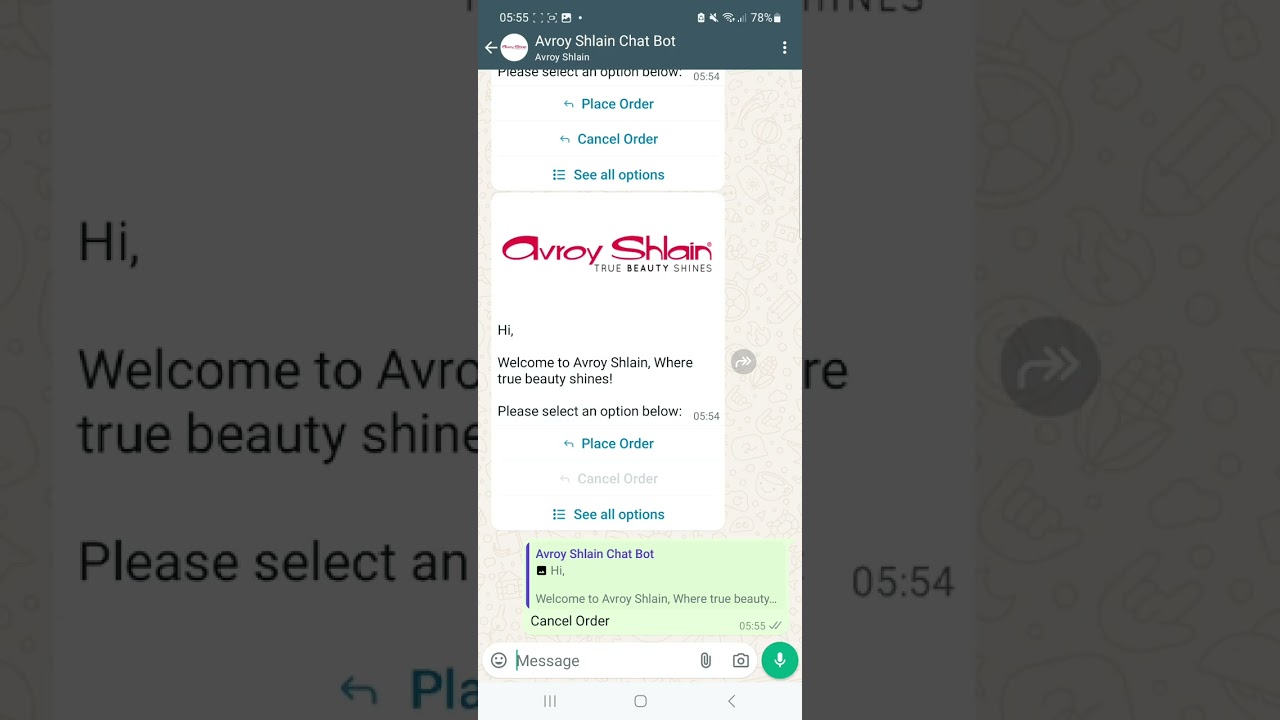
 Watch: How To Delete/Cancel an Order
  Important Rule — Read This First!
 Once an order is placed, nothing can be changed, added or edited. The only option is to delete the whole order and start again — and that is only possible before it is paid.
You cannot add items, change quantities, or edit anything on an existing order You can only delete an order before it is paid — once paid it cannot be cancelled or changed
 To fix a mistake — delete the whole order and place a brand new one
 Option 1 — Call or Email Head Office
 Always have your account number AND order number ready before you call or email!
Call Head Office (free call)0860 114 182› Call Head Office (landline)011 655 3500›  Email Head OfficeSysAidHelpdesk@avroyshlain.co.za›
  Option 2 — WhatsApp Chat Bot
The Avroy Shlain WhatsApp Chat Bot can help you cancel an order, place an order or check stock — all from WhatsApp!
You must message from the phone number that is registered on your Avroy Shlain account — not just any number!
 Check the PDF instructions from your leader for the exact WhatsApp number and step-by-step guide.
Open WhatsApp Chat Bot Instructions PDF → Option 3 — Once You're a Junior Manager
 Good News When You Level Up!
As soon as you qualify as a Junior Manager, you will be able to delete orders yourself directly through your own account — no need to call anyone!
 Another great reason to work towards becoming a Junior Manager — more control over your own business!
 Quick SummaryCannot edit, add to, or change an order — everCan only delete before it is paidCall or email head office with your account & order numberWhatsApp the Avroy Shlain Chat Bot from your registered numberAs a Junior Manager you can delete orders yourself through your account Need Help? Just Ask!Contact head office or your leader — we are always here to help you.
  WhatsApp Liza →← Back to Training
 Made with love for Team Ignite Beauty Advisors
stayravishing.com · Liza Truter · 084 990 0030
Avroy Shlain Chat Bot Instructions